 Laser MTS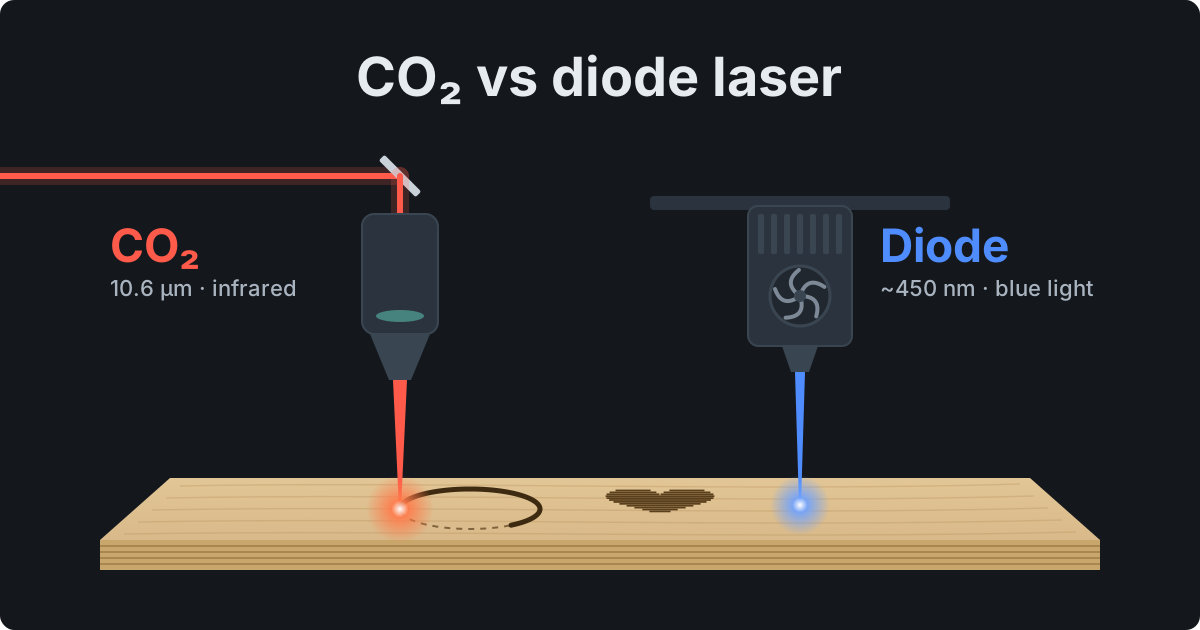
The short version
- A CO₂ laser (10.6 µm) cuts 1/8″ (3 mm) plywood several times faster than a 10–20 W diode, cuts any acrylic — clear included — and engraves glass.
- A diode laser (about 450 nm) is cheap, compact and great for engraving wood, but it can't cut clear or blue acrylic: the light goes straight through.
- “40 W” or “80 W” in a diode listing is often electrical power. Compare optical power — usually several times lower.
- Engraving and one-off gifts → diode. Plywood in batches and acrylic → CO₂. Marking steel → fiber.
Wavelength: why a diode can't cut clear acrylic
A CO₂ laser emits far-infrared light at 10.6 µm (10,600 nm). A diode laser emits blue light at roughly 445–455 nm. That's not a spec-sheet footnote: a material only heats up if it absorbs the light, and what it absorbs depends on the wavelength.
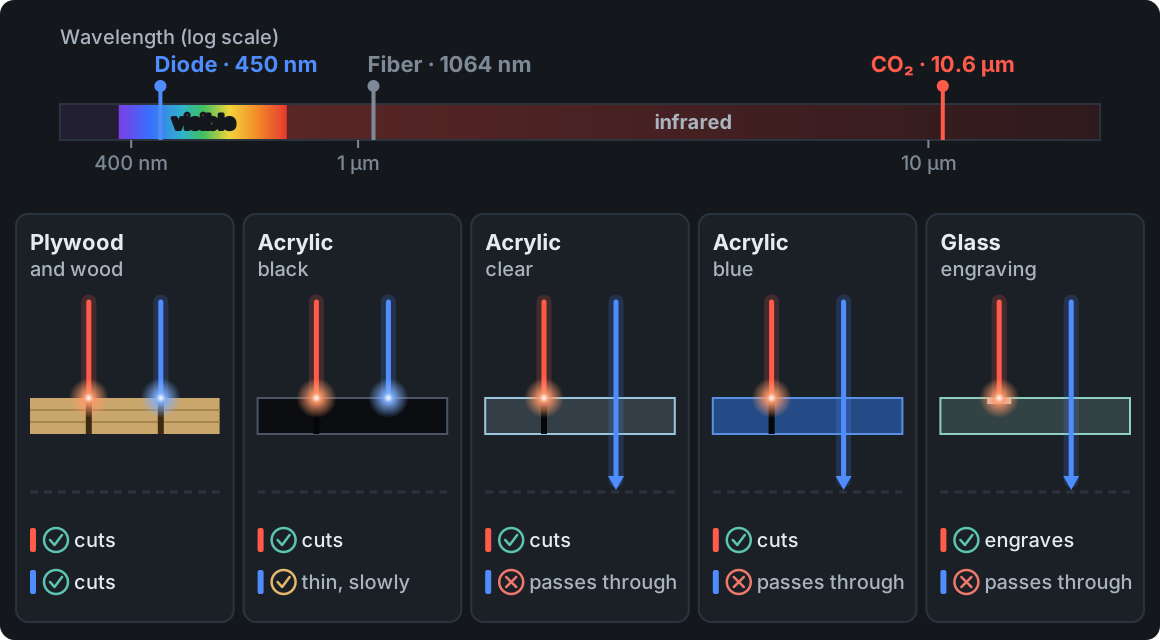
Wood, plywood, MDF, leather and paper absorb both kinds of light, so both lasers work on them. The differences show up with acrylic and glass:
- Clear acrylic lets visible light through — a blue beam passes through the sheet and scorches the bed underneath. Acrylic absorbs 10.6 µm infrared completely, which is why CO₂ cuts it cleanly with a glossy, flame-polished edge.
- Blue acrylic looks blue precisely because it transmits and reflects blue light. To a diode it's as “invisible” as clear acrylic.
- Black and dark acrylic absorbs blue light. A diode will cut a thin sheet, but slowly, in several passes and without the polished edge.
- Glass passes blue light, while its surface absorbs CO₂ infrared — hence the frosted engraving on wine glasses and bottles.
For the same reason diodes struggle with white and very light materials: they reflect much of the light. Neither laser cuts metal. Steel is marked with a fiber laser (1064 nm), a separate machine we cover briefly in Laser cutters explained. Some diode machines offer an extra infrared module for marking metal, but that doesn't change what the blue module can do.
Advertised power: electrical or optical?
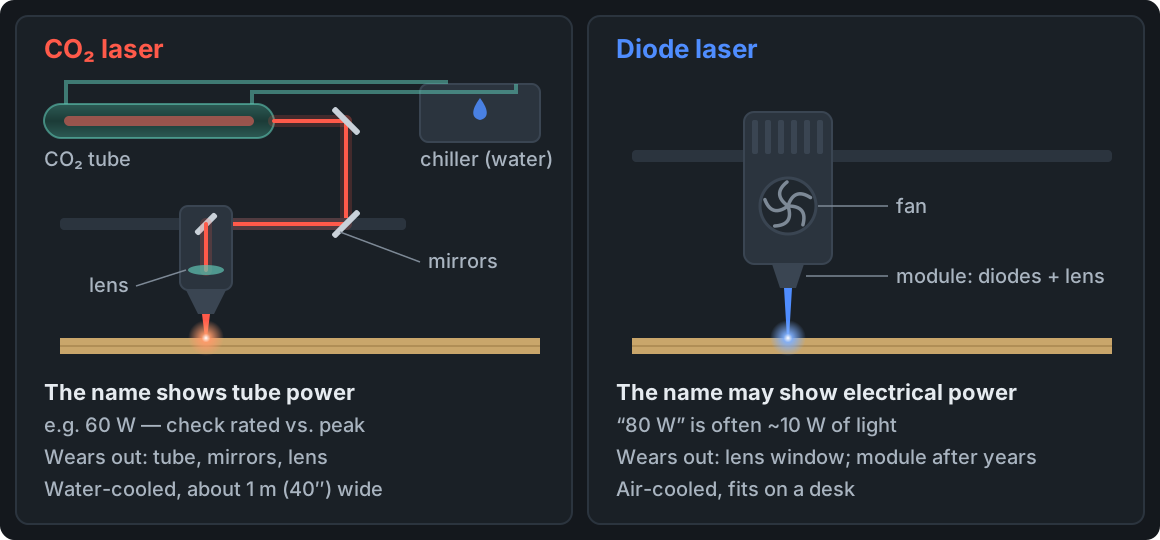
This is the most common trap when buying a diode. A module sold as “40 W” or “80 W” is often rated by the power it draws from the supply (or a marketing “equivalent”), not the light that reaches the material. In practice a “40 W” module typically puts out about 5 W of optical power, and an “80 W” one about 10 W.
- Look for optical power (also called output power) in the specs. If there's only one suspiciously high number on a cheap machine, it isn't light output.
- Stronger modules (20 W and up) combine the light of several diodes. They cut faster, but the spot is often larger, so fine engraving isn't necessarily better than with a 10 W module.
- With CO₂, look at the tube's rated power, not its peak. A tube sold as “60 W” may only reach that at maximum current, and running at maximum all the time shortens its life. The tube maker lists the safe current range.
So compare like with like: a diode's optical power against a tube's rated power.
How long it takes to cut 1/8″ and 1/4″ plywood
The difference is easiest to see on a real object. A 150 × 100 × 60 mm (about 6 × 4 × 2.4 in) finger-joint box is six panels and about 3.2 m (10.5 ft) of cut line.
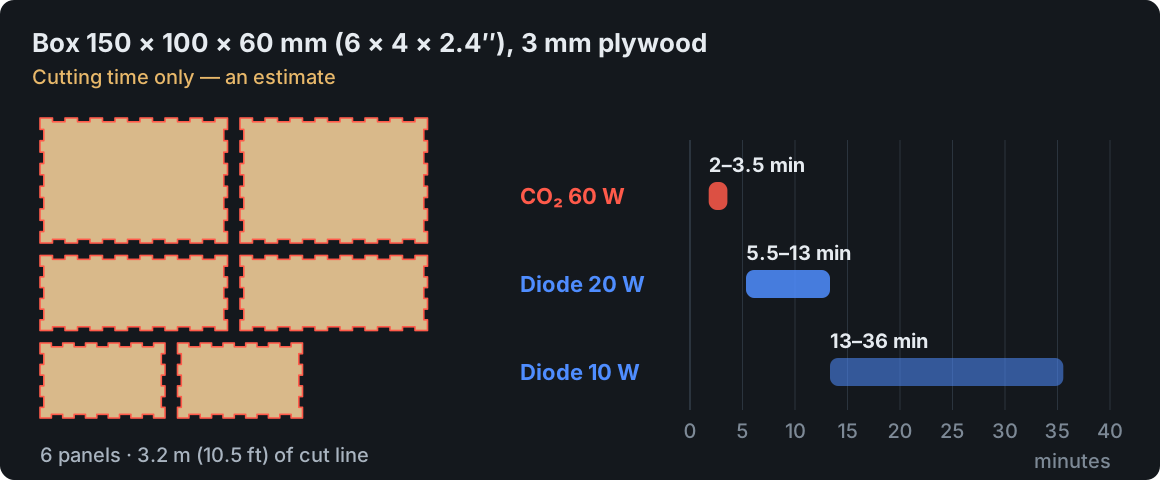
For one box the gap is ten minutes or more — up to half an hour. For an order of 30 boxes it's roughly 1–2 hours on a CO₂ laser, 3–7 hours on a 20 W diode or 7–18 hours on a 10 W diode.
| Plywood | CO₂ 60 W | Diode 20 W | Diode 10 W |
|---|---|---|---|
| 3 mm (1/8″) | 1 pass, 15–30 mm/s | 1 pass, 4–10 mm/s | 1–2 passes, effectively 1.5–4 mm/s |
| 6 mm (1/4″) | 1 pass, 6–12 mm/s | 2–3 passes, effectively 1–3 mm/s | 3–5 passes, effectively 0.5–1 mm/s |
These are ballpark ranges for Baltic birch with good air assist. Basswood and poplar plywood cut faster, boards with hard glue slower, and a lot depends on focus and lens choice. Thicker stock — 3/8″ (10 mm) and up — is practically CO₂ territory.
Slow multi-pass cutting with a diode has a side effect: more heat in the material, so darker edges and a slightly slanted cut. At 1/8″ that's cosmetic; for 1/4″ finger joints it starts to affect the fit. How to keep scorching down is covered in How to prevent laser burn marks.
Whichever laser you pick, numbers from tables are only a starting point — your sheet and your machine will behave their own way. You can check them in a few minutes with a power × speed grid from the free Laser MTS Material tests: the LightBurn file has power and speed set on every field and works the same with a CO₂ laser and a diode. More on the test itself: Laser material test.
Engraving: where diodes shine
On wood, plywood and leather a diode engraves beautifully. The spot of a 5–10 W module is small (often under 0.1 mm / 0.004 in), so fine lettering and photos come out detailed. The limit is speed: darkening wood takes a certain amount of energy per millimeter, so a weaker laser has to move slower. A CO₂ laser fills large areas several times faster.
A glass CO₂ tube, on the other hand, struggles at very low power: at the bottom of its range it fires unevenly, which makes delicate light tones in photo engraving harder. You can work around it with settings, but for getting started with photos a diode is often simpler. How to prepare the photo itself: How to laser engrave a photo.
Only CO₂ engraves glass (wine glasses, bottles). Slate, anodized aluminum and wood work with both.
Enclosure, safety and floor space
- CO₂ machines run inside a closed enclosure. The acrylic lid window blocks 10.6 µm infrared, and a lid interlock cuts the beam when the lid opens — so the machine is eye-safe with the lid closed. The rating label tells you the laser class — an enclosure doesn't automatically mean Class 1. The downside is size: a laser with a 24 × 16 in (600 × 400 mm) bed is close to 40 in wide, weighs well over 100 lb and needs a separate chiller.
- An open-frame diode is a Class 4 laser: reflected blue light can permanently damage eyesight, including for people nearby. You need glasses with the right optical density (OD) for 445–455 nm, or an enclosure with a filter window. Sunglasses don't protect you.
- Both need fume extraction (ideally vented outside, a filter unit as a fallback) and supervision for the whole job — burning plywood is a real risk with any laser.
Fire extinguishers, banned materials and a pre-job checklist are covered in Laser cutter safety.
Costs: buying and running
| Item | Diode laser | CO₂ laser |
|---|---|---|
| Purchase | 10 W open frame: about $250–600; 20–40 W enclosed: about $1,500–3,000 | 40 W “K40” (about 12 × 8 in): about $400–700; 50–80 W with a 24 × 16 in bed and chiller: about $2,500–5,000 |
| Wear parts | the module (lifetime usually quoted in thousands of hours), the lens protection window | glass tube (roughly 2,000 to 8,000+ hours depending on maker and load), lens, mirrors |
| Replacement | new module: about $100–500 | 60 W tube: about $200–500; lens: about $20–80 |
| Cooling | air, fan in the module | distilled water: a compressor chiller (a basic radiator unit only suits weaker tubes) |
| Power draw | tens of watts up to about 200 W | about 0.5–1.5 kW with chiller, exhaust fan and air pump |
| Upkeep | clean the window, check the belts | mirror alignment, cleaning optics, changing the water, freeze protection in winter |
Prices are ballpark ranges — they move fast, and brand-name machines cost more than import equivalents with similar specs. With CO₂, budget for a chiller if it's not included, and with either laser, for fume extraction.
The real cost, though, is time. If you sell what you cut, an hour of laser time is a line in your quote — a slower machine raises the cost of every piece. How to work that out is covered in Laser cutting pricing.
Which laser to buy — scenarios
- Mostly engraving — cutting boards, leather keychains, one-off gifts → a 10–20 W diode, ideally enclosed. Low price, small footprint, great detail.
- Cutting 1/8–1/4″ plywood to sell — boxes, organizers, decor in batches → a 50–80 W CO₂ with a bed of at least 24 × 16 in. On batch work the speed pays back the price difference.
- Working with acrylic — signs, awards, keychains, edge-lit plaques → CO₂ only.
- Engraving glass → CO₂. Slate and anodized aluminum → either.
- Marking steel — knives, tools, nameplates → a fiber laser, a separate machine.
- Just finding out if lasers are for you → a 10 W diode is enough to learn on. But if you plan to sell cut parts from day one, buying CO₂ straight away often ends up cheaper than a diode now and a CO₂ a year later.
Many shops end up with two machines: a CO₂ for cutting and a diode or fiber for engraving and metal.
Frequently asked questions
Can a diode laser cut 1/4 inch plywood?
Yes, in several passes: a 20 W diode usually needs 2–3, a 10 W one 3–5, with darker edges. If 1/4″ is your everyday material, a CO₂ laser does it in one pass and several times faster.
Can a diode laser cut acrylic?
Only dark, opaque acrylic, ideally thin. It won't cut clear, blue or very light acrylic — the blue light passes through or bounces off.
What does “80 W” mean on a diode laser?
Usually power drawn from the supply or a marketing equivalent, not light output — the optical power is typically around 10 W. Look for “optical power” in the specs.
How long does a CO₂ laser tube last?
Roughly 2,000 to 8,000+ hours for a glass tube, depending on the maker, cooling and how hard you drive it. Power fades gradually: when old settings no longer cut through and the optics and focus are fine, the tube is nearing replacement.
Should a beginner buy a CO₂ or a diode laser?
If you mostly engrave and make one-offs — a diode. If you want to cut plywood in batches or work with acrylic — go straight to CO₂; it saves time on every job.